September 2026 · Live online · North America — USA & Canada Cohort

Build a Primavera P6programme you can defend—from logic and resourcesto S-curves and decision-ready reports.Build a P6 programme you can explain, defend and report.

Across five live Saturdays, build The Pathfinder 500 Construction Capstone with Dr Francis Osadare. Build, resource, cost, update and report a realistic 500-activity construction programme in Primavera P6.

For aspiring and working planners, schedulers, engineers and project-controls professionals.

One-off payment · Secure Stripe checkout · First-session guarantee

Dates
19 Sep–17 Oct
Live training
Five Saturdays · 20 hours
500
capstone activities
50
paid seats
20
live hours
04
recorded bonus labs
01
connected programme

Cohort deadline

Enrolment closes before the live build begins.

The deadline is fixed to this cohort and does not reset when you refresh the page.

Enrolment deadline

Calculating the fixed cohort deadline…

Enrolment closes at 11:59 pm UK time on 16 September 2026, or earlier if all 50 paid seats are taken.

One capstone, end to end

Build the programme. Load the plan. Turn the data into decisions.

The same Pathfinder 500 capstone moves through each live Saturday, so every output has a traceable origin.

Pathfinder 500 workflow
  1. 01

    P6 programme

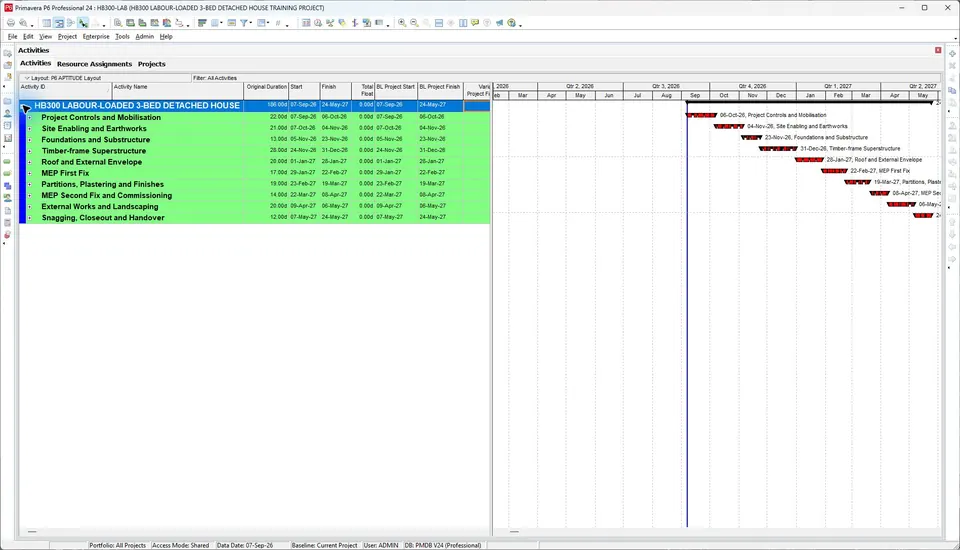
    Structure the WBS, activities, calendars, codes, UDFs, logic, critical path, float and constraints.

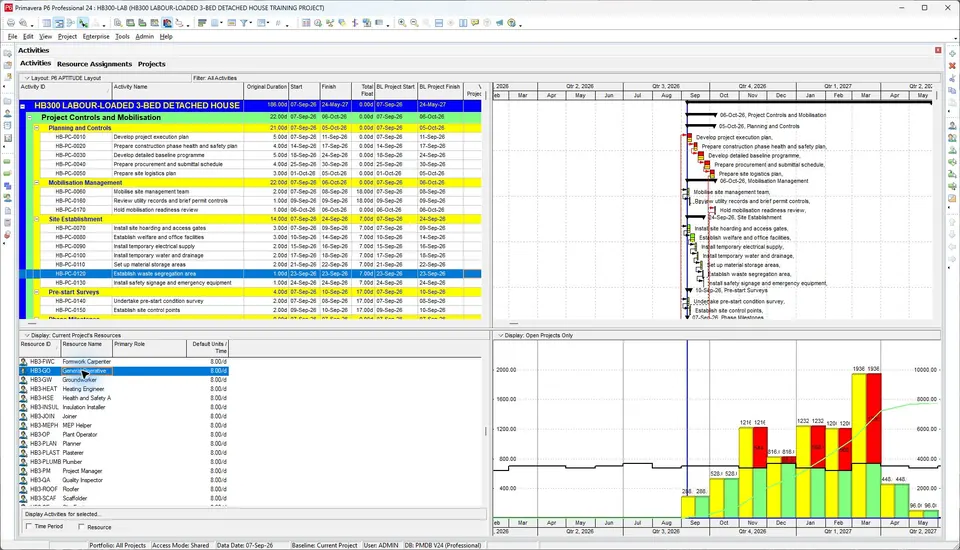
    Genuine Primavera P6 Gantt programme
  2. 02

    Resource and cost loading

    Assign labour, non-labour, materials, planned units, rates, expenses and budgets.

    Genuine Primavera P6 resource profile
  3. 03

    Excel decision reporting

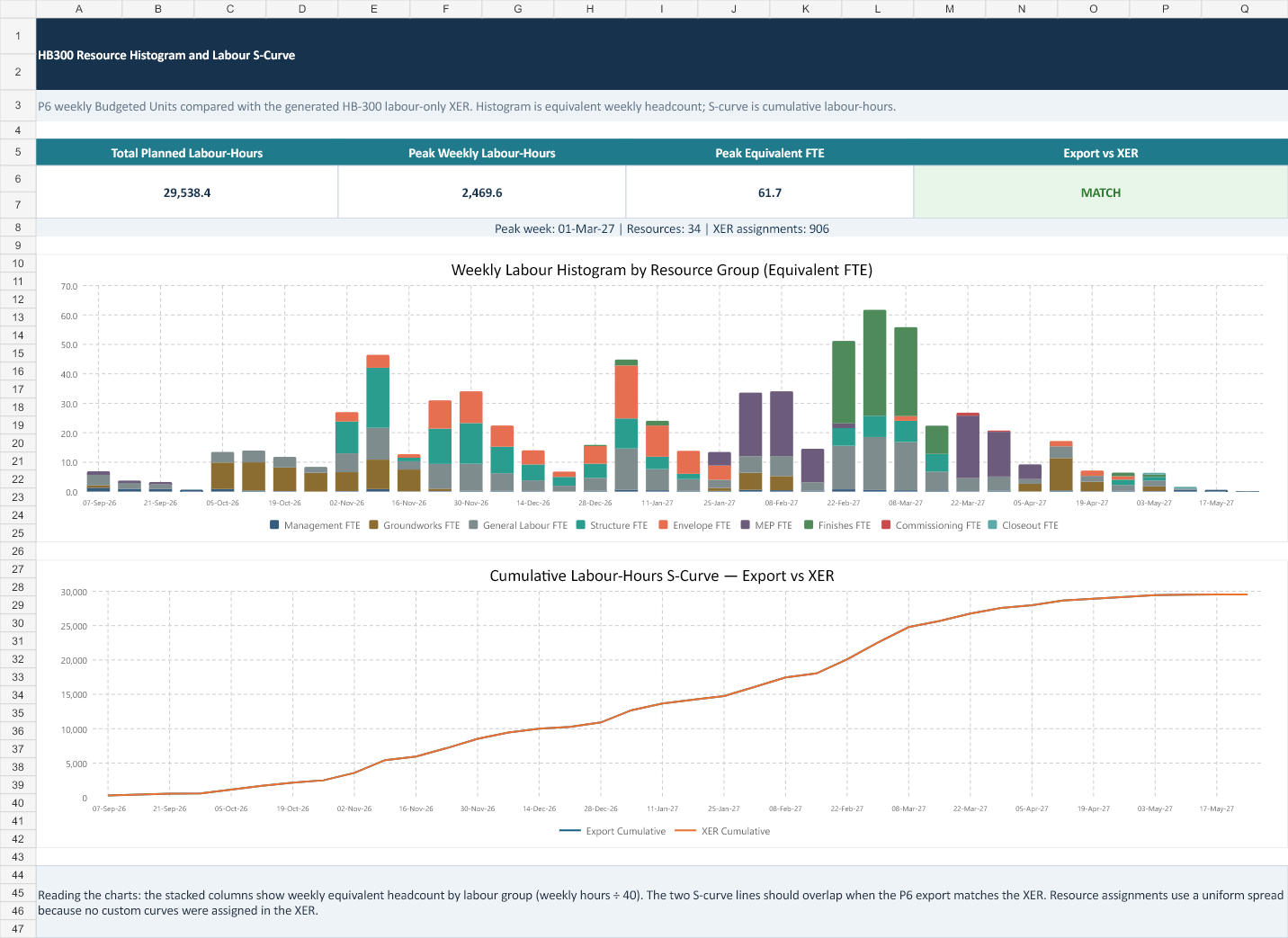
    Reconcile exports, then analyse histograms, S-curves, heatmaps and planned-versus-actual reporting.

    Genuine Excel histogram and S-curve produced from P6 data

Genuine output proof

Inspect the work before you reserve a seat.

These approved P6 and Excel outputs show the methods and reporting standard applied during Pathfinder 500. Original labels are preserved; no software screen has been fabricated or relabelled.

Course outputs
Genuine P6 output

A structured construction programme you can interrogate.

Question
What controls the finish date, and can you explain it?
Business use
Review WBS, calendars, logic, critical path, float, constraints and activity sequencing before presenting the programme.
Genuine P6 output

Time-phased resource demand connected to the schedule.

Question
When is demand highest, and which assignments create the peak?
Business use
Interpret resource profiles and histograms before turning the same data into reporting outputs.
Genuine Excel output

A reconciled labour histogram and cumulative S-curve.

Question
Do exported P6 assignments and the Excel analysis agree?
Business use
This genuine HB300 training output demonstrates the same export, reconciliation and reporting method applied during Pathfinder 500.
Technical output views

Move from programme logic to decision-ready reporting.

Genuine P6 output

A structured construction programme you can interrogate.

Question
What controls the finish date, and can you explain it?
Business use
Review WBS, calendars, logic, critical path, float, constraints and activity sequencing before presenting the programme.

The planner transformation

Become the planner who can explain the programme—not merely operate the software.

The value of this training is not the time you spend watching Primavera P6. It is the practical capability, professional evidence and confidence you build by applying it to a realistic project.

  1. Before the course

    An incomplete workflow

    • You can open P6, but you do not yet have a complete planning workflow.
    • Dates move and you struggle to explain the logic, float or critical path.
    • Resources, costs and progress updates feel like separate processes.
    • Your exports and reports are not yet ready for clients or project meetings.
  2. The guided live build

    A connected, reviewed method

    • Build a structured programme using calendars, WBS, activities, codes and UDFs.
    • Quality-check logic, constraints, milestones, float and the critical path.
    • Assign labour, non-labour, materials and costs to realistic activities.
    • Establish a baseline, record progress and compare planned with actual performance.
    • Produce professional Gantt layouts, PDF schedule packs, look-aheads, histograms and S-curves.
    • Explain decisions during guided exercises and instructor-led reviews.
  3. After the course

    Professional outputs you can explain

    • Build and quality-check a complete P6 programme from a project brief.
    • Diagnose why dates moved and communicate the effect clearly.
    • Resource-load, cost-load and update a schedule using a repeatable workflow.
    • Convert P6 data into decision-ready reports and visual project-controls outputs.
    • Present the programme with greater professional confidence.
    • Demonstrate what you can produce—not simply say you attended P6 training.

What is included

A connected live build with practical outputs at each stage.

The course stays focused on confirmed training, capstone work and reporting deliverables.

What is included
01

Five live Saturdays

Four guided hours each between 19 September and 17 October 2026.

02

Pathfinder 500 connected capstone

A realistic 500-activity construction programme developed from setup to stakeholder reporting.

03

Nine practical live modules

Project setup, logic, resources, costs, progress, reporting and P6-to-Excel analysis.

04

Four recorded bonus labs

Multiple projects, controlled data exchange, earned-value fundamentals and recovery scenarios.

05

Workplace-ready outputs

Gantt layouts, PDF packs, look-aheads, profiles, histograms, S-curves, heatmaps and dashboards.

06

Preparation guidance

A clear Windows and P6 Professional checklist before the first live Saturday.

Choose with clarity

Built for practical planning and project-controls work.

Who the course is for

This is for you if…

  • Aspiring planners and schedulers who need a complete practical workflow
  • Working planners who want stronger resource, cost, update and reporting discipline
  • Engineers moving into planning or project controls
  • Project-controls professionals who need defensible P6-to-Excel outputs

This is not positioned as…

  • Primavera P6 database administration
  • Forensic delay analysis or expert-witness training
  • Formal certification-exam preparation
  • A P6 software licence or managed installation service

Practical learning path

From a blank project to a defensible control pack

Nine focused modules. Five live sessions. Every week ends with a practical output you can use on a real project.

Course curriculum

CAPABILITY PROMISE

Establish the organisational structure, calendars and reusable workspace that every reliable P6 programme needs.

Skills you will master

  • Navigate the Primavera P6 interface and project workspace
  • Place the project correctly within the EPS and OBS
  • Create global and project calendars that control working time
  • Configure the project and save reusable working layouts
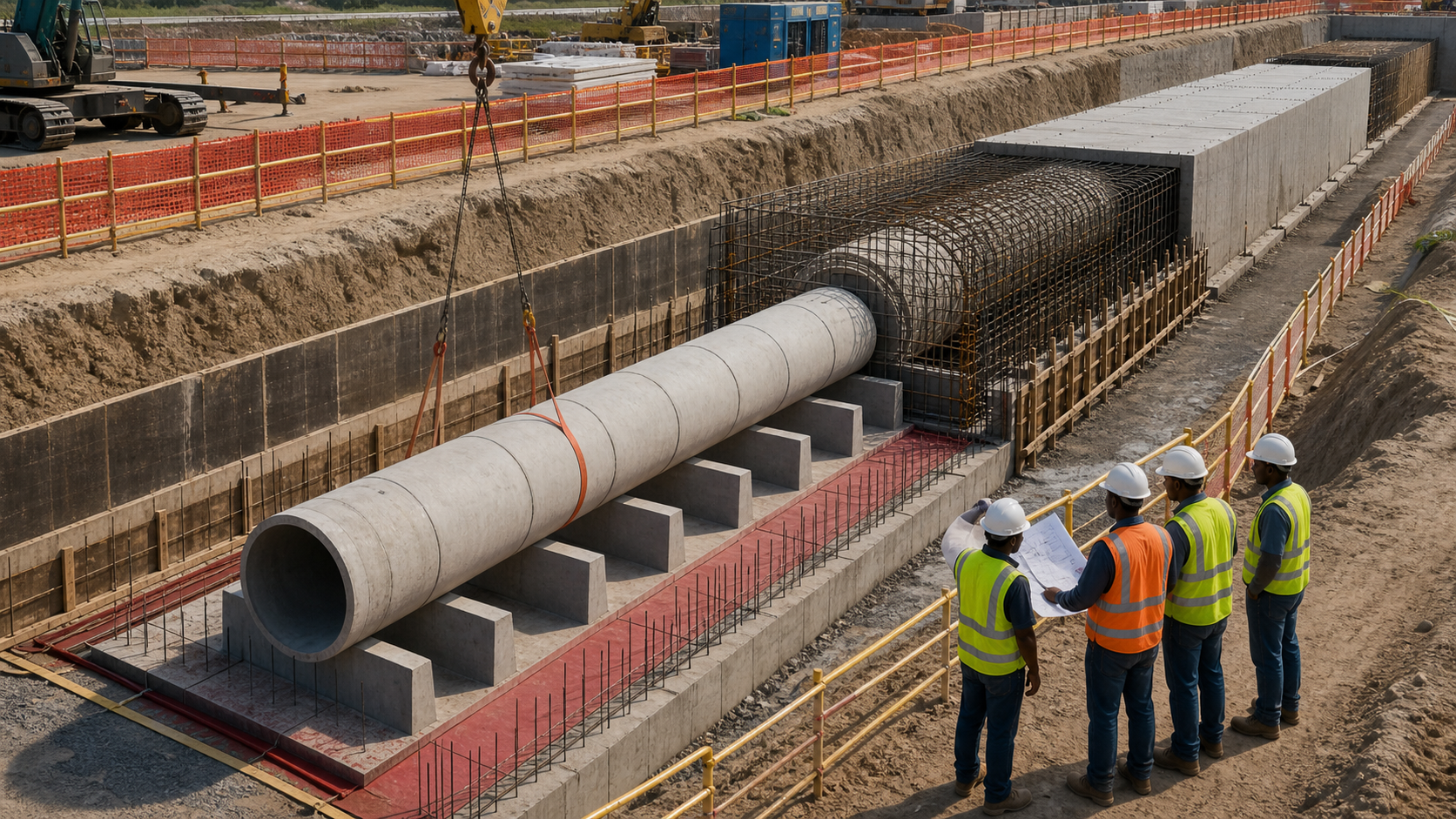
Culvert installation project used for the Pathfinder 500 planning exercise.

Signature live project

Meet the Pathfinder 500

One realistic infrastructure project. 500 connected activities. The complete planning-and-controls workflow.

Using a major culvert and utility installation as the project brief, you will turn construction scope into a structured P6 programme, load resources and costs, update progress and produce the information a project team expects.

Multi-level WBS and 500 activitiesLabour, non-labour and material resourcesActivity codes, cost accounts and UDFsLogic, baselines and progress updatesHistograms, S-curves and look-ahead reportsWhat-if analysis and recovery recommendations

Your final control pack brings together the P6 schedule, Excel analysis, professional layouts, PDF reports and a concise schedule narrative.

Included learner resources

The True Troop Planner’s Toolkit

Leave with a repeatable control system—not simply a folder of lecture notes.

The True Troop Planner’s Toolkit

These editable working resources will be introduced and issued progressively as the relevant topics are taught. Formats may be refined before delivery to match the live exercises.

Issued during the programme

Project Setup Pack

Project brief, WBS dictionary, calendar register, coding and UDF register, and schedule-build checklist.

WordExcelP6

Issued during the programme

Progress Update Pack

Data-date checklist, baseline and change log, update tracker, progress narrative, and variance register.

WordExcelP6

Issued during the programme

Look-ahead & Reporting Pack

4-week and 16-week look-aheads, weekly report, meeting action log, and print-ready PDF layouts.

WordExcelP6

Issued during the programme

Resource & Cost Pack

Labour, non-labour and material loading sheets, cost-account register, resource histogram, and planned-versus-actual tracker.

ExcelP6

Issued during the programme

Excel Controls Pack

S-curve workbook, resource heatmap, project-controls dashboard, variance tracker, and chart-ready P6 export structure.

ExcelP6

Issued during the programme

Schedule Assurance & Recovery Pack

Schedule-health checklist, open-end and constraint review, what-if comparison, and recovery-plan template.

WordExcelP6
Dr Francis Osadare, live Primavera P6 instructor

Instructor authority

Learn the reasoning behind the workflow, not only where to click.

Dr Francis Osadare teaches Primavera P6 from a practitioner’s perspective: what the software is calculating, what the result means and how to present it clearly.

Across five live Saturdays, he builds Pathfinder 500 with you step by step, making the logic, resource decisions, update discipline and reporting chain visible.

PMP · PMI-RMP
Project and risk credentials
LLM · MSc
Advanced academic qualifications
“A schedule becomes useful when you can explain why it moved, what the resources are doing and what decision the report supports.”

How live learning works

Watch the method, build alongside and question the result.

The course combines genuine technical outputs with instructor-led reasoning and approved teaching imagery.

How live learning works
Dr Francis Osadare teaching a classroom of planning and project-controls professionals
Live explanation and practical questioning in a professional learning setting.
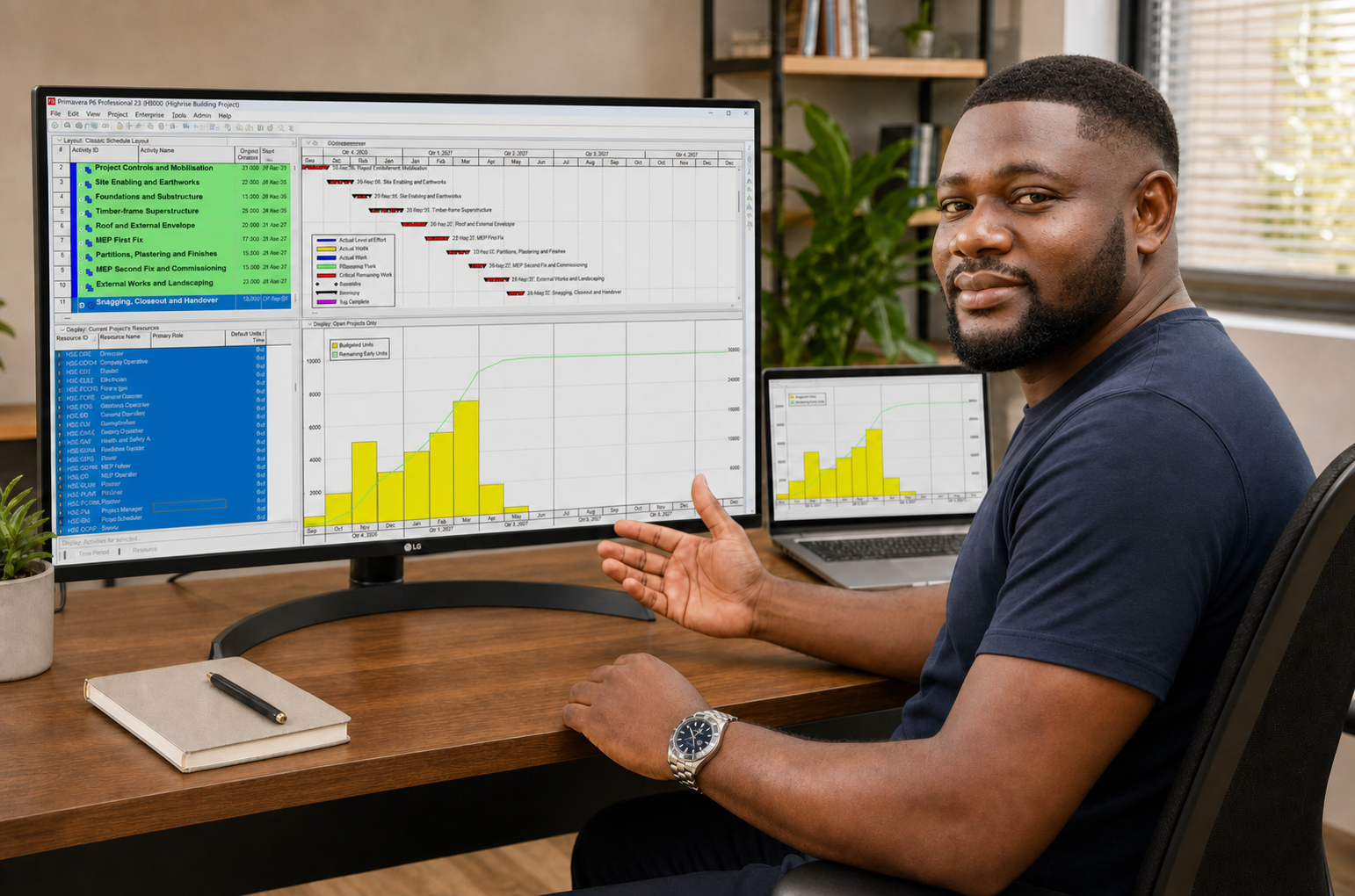
Dr Francis demonstrating Primavera P6 programme and resource-profile outputs during practical training.
Online delivery with the instructor, programme and reporting workflow visible together.
01

Watch the workflow

See each P6 and Excel decision in sequence.

02

Build alongside

Apply the same method to the connected Pathfinder 500 capstone.

03

Question the result

Ask why dates, float, resources, costs or charts changed.

04

Carry the output forward

Each session produces an artefact that feeds the next stage.

Dates and delivery

Five live Saturdays on one consistent UK timetable.

Course dates and times
  1. 0119 September 2026

    Project setup, EPS, OBS, calendars, WBS, activities, codes and UDFs

  2. 0226 September 2026

    Logic, critical path, float, constraints, layouts and PDF packs

  3. 033 October 2026

    Labour, non-labour, materials, planned units, costs and cash flow

  4. 0410 October 2026

    Baselines, data date, updates, planned-versus-actual variance and schedule health

  5. 0517 October 2026

    Look-aheads, P6 reports, histograms, S-curves, heatmaps and dashboards

Requirements and expectations

Prepare the software before the first Saturday.

Technical requirements
  • A suitable Windows environment
  • A working Primavera P6 Professional installation
  • Permission to save project files and export to Excel
  • A stable internet connection for live screen sharing

The Primavera P6 software licence is not included. Installation support is not promised as part of the course.

Workplace application

Finish with outputs you can explain and use.

Course outcomes
01

Explain why the date moved

Trace logic, calendars, constraints, duration types and open ends instead of blaming the software.

02

Build a resource- and cost-loaded plan

Assign labour, non-labour and material resources, planned units, rates and expenses, then read demand and cash flow.

03

Update and defend the programme

Baseline the plan, move the data date, enter progress, explain planned-versus-actual variance and assess schedule health.

04

Turn P6 data into decisions

Produce PDF packs, look-aheads, histograms, S-curves, heatmaps and Excel dashboards for stakeholders.

01

First-session guarantee

Attend the first Saturday. Continue only if it delivers.

Attend the full first live Saturday. If the course is not what this page promised, email support@thetruetroopconsulting.com before the second Saturday begins for a full course-payment refund.

September 2026 cohort

Build a P6 programme you can explain, defend and report.

Five live Saturdays, nine practical modules, four recorded bonus labs and one connected Pathfinder 500 capstone.

Course dates
19 Sep–17 Oct 2026
Capacity
50 paid seats
Payment
One-off · USD

Essential questions

Know exactly what you are buying.

Frequently asked questions
Who is this Primavera P6 course for?

It is for planners, schedulers, project-controls professionals, engineers, construction professionals and learners who want practical P6 capability built through one guided capstone.

When are the live sessions?

The five live Saturdays run from 4:00 pm to 8:00 pm UK time between 19 September and 17 October 2026. Check your local time before enrolling.

What does registration cost?

$799 as a one-off course payment. This is not a subscription.

What is The Pathfinder 500 Construction Capstone?

Pathfinder 500 is a realistic 500-activity construction capstone with varied WBS levels, logic, calendars, activity and cost codes, user-defined fields, labour, non-labour and material resources, costs, progress and reporting outputs.

Are the classes live and instructor-led?

Yes. Dr Francis leads the live sessions and explains the reasoning behind each P6 and Excel output, not only the sequence of clicks.

Does the course cover resource and cost reporting?

Yes. You will work with labour, non-labour and material assignments, profiles and histograms, then turn exported P6 data into S-curves, heatmaps, look-aheads and stakeholder-ready reports.

Is Primavera P6 software included?

No. You need a suitable Windows environment and a working Primavera P6 Professional installation before the first live Saturday. The software licence is not included.

What if I cannot attend a live Saturday?

The course is designed for live participation. The four bonus labs are recorded, but no live-session replay is promised on this page. Contact support before paying if you already know you will miss a Saturday.

What is the first-session guarantee?

Attend the full first live Saturday. If the course is not what this page promised, email support@thetruetroopconsulting.com before the second Saturday begins for a full course-payment refund.

Can my employer pay or request an invoice?

Yes. Contact info@thetruetroopconsulting.com before enrolling if your employer needs an invoice or purchase-order route.

How is card payment handled?

Payment is completed on Stripe’s secure hosted checkout. Card details do not pass through this website. Live charges remain disabled until owner approval.
$799Reserve seat